🎬 Action 函数:自定义交互式按钮
Action 函数会在您的服务器上执行任意 Python 代码。 函数的创建权限仅限于管理员。请仅安装来自信任源的函数,并在导入前仔细审核代码。恶意的 Function 可能会访问您的文件系统、窃取数据或破坏您的整个系统。有关完整详情,请参阅 Plugin 安全警告。
Action 函数允许您编写自定义的按钮,这些按钮会出现在消息工具栏中供终端用户互动。此功能实现了更具交互性的消息传递,例如允许用户在执行任务前授予权限、生成结构化数据的可视化、下载聊天的音频片段以及许多其他使用场景。
Action 函数应当始终被定义为 async。后端正在逐步走向完全异步的执行,同步函数可能会阻塞执行或在未来的版本中导致问题。
Actions 是由管理员管理的函数,可以通过自定义交互能力扩展聊天界面。当一条消息是由配置了 actions 的模型生成时,这些 actions 将作为可点击的按钮显示在消息上方。
在下方的函数结构章节中显示了一个极简的脚手架。想要浏览由社区构建的真实 Action 示例,请访问 openwebui.com。
下面这个视频展示了一个图表可视化 Action 的示例。
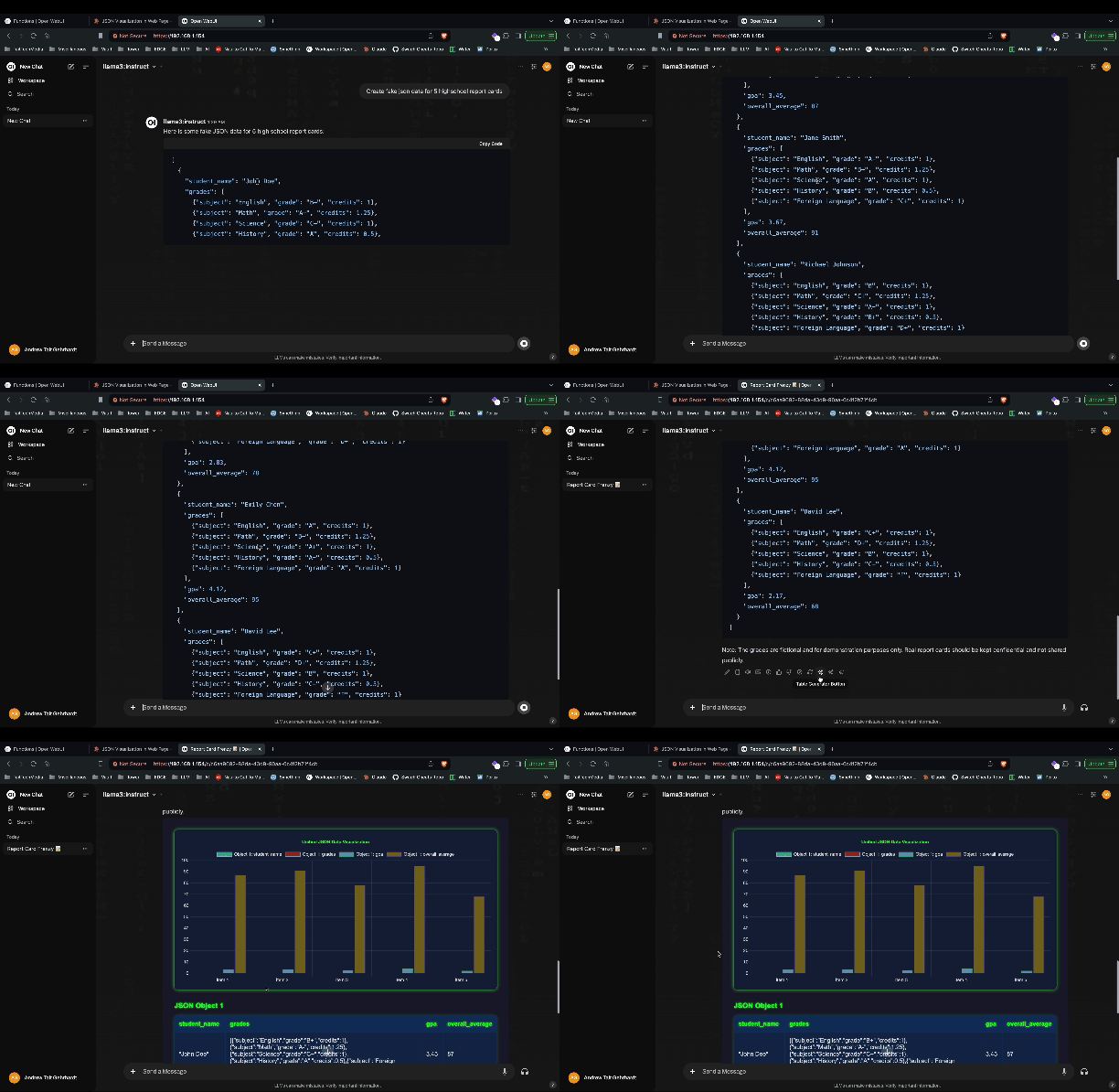
Action 函数架构
Actions 是基于 Python 的函数,直接集成到聊天消息工具栏中。它们在服务器端执行,并可以通过实时事件与用户交互、修改消息内容以及访问完整的 Open WebUI 上下文。
函数结构
Actions 遵循特定的类结构,以 action 方法作为主入口点:
class Action:
    def __init__(self):
        self.valves = self.Valves()

    class Valves(BaseModel):
        # 配置参数
        parameter_name: str = "default_value"
        priority: int = 0  # 控制按钮显示顺序(越低 = 越先显示)

    async def action(self, body: dict, __user__=None, __event_emitter__=None, __event_call__=None):
        # Action 的具体实现
        return {"content": "修改后的消息内容"}
Action 方法参数
action 方法接收几个参数,用以提供对执行上下文的访问:
body- 包含消息数据和上下文的字典__user__- 带有权限和设置的当前用户对象__event_emitter__- 用于向前端发送实时更新的函数__event_call__- 用于双向通信的函数(确认、输入)__model__- 触发该动作的模型信息__request__- 用于访问标头等的 FastAPI 请求对象__id__- Action ID(在多 action 函数中很有用)
事件系统集成
Actions 可以利用 Open WebUI 的实时事件系统来创造互动体验:
事件发射器(__event_emitter__) {#event-emitter-event_emitter}
有关事件和事件发射器的更多信息,请参阅事件和事件发射器。
在 action 执行期间向前端发送实时更新:
async def action(self, body: dict, __event_emitter__=None):
    # 发送状态更新
    await __event_emitter__({
        "type": "status",
        "data": {"description": "正在处理请求..."}
    })

    # 发送通知
    await __event_emitter__({
        "type": "notification",
        "data": {"type": "info", "content": "Action 成功完成"}
})事件调用(__event_call__) {#event-call-event_call}
在执行期间向用户请求输入或确认:
async def action(self, body: dict, __event_call__=None):
    # 向用户请求确认
    response = await __event_call__({
        "type": "confirmation",
        "data": {
            "title": "确认操作",
            "message": "您确定要继续吗?"
        }
    })

    # 向用户请求输入
    user_input = await __event_call__({
        "type": "input",
        "data": {
            "title": "输入数值",
            "message": "请提供额外信息:",
            "placeholder": "在此输入您的内容..."
        }
    })
Action 类型和配置
单个 Action
拥有一个 action 方法的标准 action:
async def action(self, body: dict, **kwargs):
    # 单个 action 实现
    return {"content": "Action 结果"}
多个 Action
函数可以通过 actions 数组定义多个子 action:
actions = [
    {
        "id": "summarize",
        "name": "总结",
        "icon_url": "https://example.com/icons/summarize.svg"
    },
    {
        "id": "translate",
        "name": "翻译",
        "icon_url": "https://example.com/icons/translate.svg"
    }
]

async def action(self, body: dict, __id__=None, **kwargs):
    if __id__ == "summarize":
        # 总结逻辑
        return {"content": "总结:..."}
    elif __id__ == "translate":
        # 翻译逻辑
        return {"content": "翻译:..."}
全局 vs 特定于模型的 Action
- 全局 Actions - 开启 Action 设置中的开关,即可为所有用户和所有模型全局启用它。
- 特定于模型的 Actions - 在模型设置中为特定模型配置已启用的 actions。
按钮显示顺序(优先级)
助手消息下方的 action 按钮会根据其 priority 阀门(valve)的值按升序进行排序 — 较低的值最先出现(最左侧),较高的值较后出现(最右侧)。默认优先级为 0。
要控制显示顺序,请在您的 Action 的 Valves 中添加 priority 字段:
class Valves(BaseModel):
    priority: int = 0  # 越低 = 在按钮行中越先显示
这使用了与 Filter 函数 相同的优先级机制,因此其行为在整个插件系统里保持一致。在没有 priority 阀门的情况下,actions 的优先级默认为 0,并且在优先级相同的情况下,它们的顺序由函数 ID 字母顺序决定。
高级功能
后台任务执行
对于长时间运行的操作,actions 可以与任务系统集成:
async def action(self, body: dict, __event_emitter__=None):
    # 启动长时间运行的进程
    await __event_emitter__({
        "type": "status",
        "data": {"description": "正在启动后台处理..."}
    })

    # 执行耗时操作
    result = await some_long_running_function()

    return {"content": f"处理完成:{result}"}
文件和媒体处理
Actions 可以处理上传的文件并生成新媒体:
async def action(self, body: dict):
    message = body

    # 访问上传的文件
    if message.get("files"):
        for file in message["files"]:
            # 根据类型处理文件
            if file["type"] == "image":
                # 图像处理逻辑
                pass

    # 返回新文件
    return {
        "content": "分析完成",
        "files": [
            {
                "type": "image",
                "url": "generated_chart.png",
                "name": "分析图表"
            }
        ]
    }
用户上下文和权限
Actions 可以访问用户信息并遵从权限控制:
async def action(self, body: dict, __user__=None):
    if __user__["role"] != "admin":
        return {"content": "此操作需要管理员权限"}

    user_name = __user__["name"]
    return {"content": f"你好 {user_name},管理员操作已完成"}
示例 - 指定 Action 前置元数据
每个 Action 函数都可以在顶部包含一个文档字符串,以定义按钮的元数据。这有助于自定义 Open WebUI 中 Action 的显示和行为。
支持的前置元数据字段示例:
title:Action 的显示名称。author:创建者名称。version:Action 的版本号。required_open_webui_version:Open WebUI 的最低兼容版本。icon_url(可选):指向图标图片的 URL(PNG、SVG、JPEG 等)。虽然技术上支持 base64 数据 URI,但强烈建议使用托管的 URL — 请参阅下方的警告。
不要嵌入 base64 编码的图片作为您的 icon_url。每个 action 的图标数据都会包含在 /api/models API 响应中,在每次页面加载时,该响应都会针对启用了该 action 的每个模型发送到前端。
影响示例: 如果您为一个 action 使用了 500 KB 的 base64 图标,并且该 action 在 20 个模型上被启用,那么仅仅对于这一个 action,API 响应就会增加 20 × 500 KB = ~10 MB。如果您有三个这样的 action,这就会变成 ~30 MB 的无用数据负载。这会导致:
- 显著降低所有用户的的前端加载速度
- 增加每个请求的后端内存占用和网络带宽
- 降低整体用户体验,在网速慢时尤为明显
相反,请将您的图标托管为静态文件(例如,托管在您的 Web 服务器、CDN 或公共 URL 上)并使用 URL 进行引用。这可以使 API 的负载保持在极小水平。
示例(推荐 — 使用 URL 图标):
示例
"""
title: Enhanced Message Processor
author: @admin
version: 1.2.0
required_open_webui_version: 0.5.0
icon_url: https://example.com/icons/message-processor.svg
requirements: requests,beautifulsoup4
"""

from pydantic import BaseModel

class Action:
    def __init__(self):
        self.valves = self.Valves()

    class Valves(BaseModel):
        api_key: str = ""
        processing_mode: str = "standard"

    async def action(
        self,
        body: dict,
        __user__=None,
        __event_emitter__=None,
        __event_call__=None,
    ):
        # 发送初始状态
        await __event_emitter__({
            "type": "status",
            "data": {"description": "正在处理消息..."}
        })

        # 获取用户确认
        response = await __event_call__({
            "type": "confirmation",
            "data": {
                "title": "处理消息",
                "message": "您要对这条消息进行增强处理吗?"
            }
        })

        if not response:
            return {"content": "操作已被用户取消"}

        # 处理消息
        original_content = body.get("content", "")
        enhanced_content = f"Enhanced: {original_content}"

        return {"content": enhanced_content}
最佳实践
错误处理
始终在您的 action 中实现合理的错误处理:
async def action(self, body: dict, __event_emitter__=None):
    try:
        # Action 逻辑
        result = perform_operation()
        return {"content": f"成功:{result}"}
    except Exception as e:
        await __event_emitter__({
            "type": "notification",
            "data": {"type": "error", "content": f"Action 失败:{str(e)}"}
        })
        return {"content": "Action 运行遇到错误"}
性能考量
- 对 I/O 操作使用 async/await
- 为外部 API 调用设置超时
- 为运行耗时的操作提供进度更新
- 考虑在繁重的处理中使用后台任务
用户体验
- 始终通过事件发射器提供清晰的反馈
- 针对破坏性动作使用确认对话框
- 包含有用的错误提示信息
与 Open WebUI 功能集成
Actions 可以与 Open WebUI 的其他功能无缝集成:
- Models - Actions 可以特定于模型,也可以是全局的
- Tools - Actions 可以调用外部工具和 API
- Files - Actions 可以处理上传的文件并生成新文件
- Memory - Actions 可以访问对话历史和上下文
- Permissions - Actions 会遵循用户角色和访问控制
- Rich UI 嵌入 - Actions 可以返回 HTML 内容,在聊天中渲染为交互式的 iframe
如果想要获取更多示例和社区贡献的 actions,请访问 https://openwebui.com/search,您可以在那里发现、下载和探索由 Open WebUI 社区构建的自定义函数。